

Python is no longer just “glue” for scripts or a tool for data scientists. In modern IT, it is the foundation of powerful backend systems and AI solutions. However, the first project for a commercial client or the transition from simple scripts to an enterprise environment can be painful. Many teams fall into performance traps (the famous GIL) or architectural pitfalls that turn a project into hard-to-maintain “spaghetti” after a few months. If you want to avoid traps in Python and learn how to create enterprise-class software, this guide is for you. We will analyze a list of 7 key aspects and the most frequently committed errors that you need to take care of when creating professional software. If you are interested in the practical use of Python for analysis, this article will also cover these issues. Understanding the nature of errors in Python is the first step to mastery.
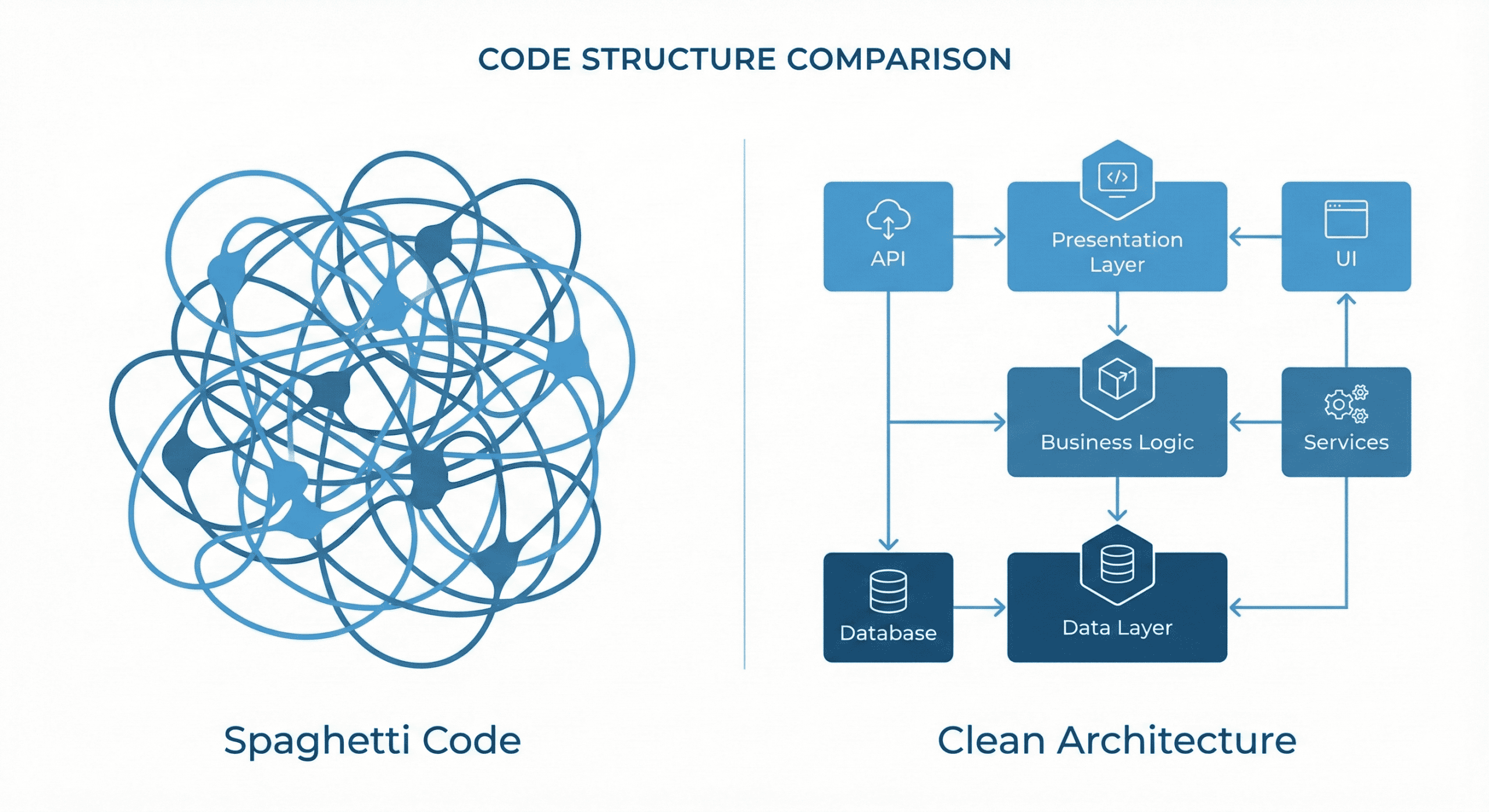
1. Ignoring architecture and project management (spaghetti code vs clean architecture)
Problem: Python’s simplicity can be deceptive. Without imposing rigid frameworks, code quickly becomes chaotic, and business logic mixes with the framework. Proper project structure management is often overlooked at the beginning, which takes its toll during the maintenance phase. Improper organization of code in Python leads to hard-to-detect problems.
Solution: In large projects, you must go beyond standard framework structures. Implement proven patterns such as DDD or hexagonal architecture. They allow you to isolate logic from the data layer. Remember that code in Python is not written “for a moment” – it must be scalable. To program effectively, you must care about quality from the first lines of code.
2. Typing errors and improper variable usage
Problem: “Python is dynamic, so I don’t need types”. This approach in a project with thousands of lines of code is a recipe for disaster. A common problem is errors related to the wrong variable type, e.g., trying to add an int to a float without explicit conversion, which can generate unexpected results or `TypeError`. Equally dangerous is unknowingly overwriting built-in names, which makes variable usage confusing (e.g., overwriting `list` or `str`).
Solution: To avoid typical mistakes, treat type hints (PEP 484) as mandatory. Introduce static code analysis (MyPy) into your CI/CD pipeline. A defined type of a variable is documentation that does not expire. Remember to keep variable names descriptive and data types always controlled.
# Bad (no types, unclear names):
def calc(a, b):
    return a + b

# Good (type hints and clear names):
def calculate_transaction_total(net_amount: float, tax: float) -> float:
    return net_amount + tax
3. Tool selection: Appropriate library and framework for the task
Problem: Manually writing functionality for which a ready-made library exists. Many people try to embed their own solutions where standard tools are more efficient.
Solution: Choose technology for the problem. The Python ecosystem is huge.
- Building a CMS? Choose Django. Creating an API? Bet on FastAPI.
- Want to perform data analysis and automation? Check if the Pandas library (alias pd) won’t do it faster.
- For machine learning, Matplotlib and Scikit-learn are the standard.
4. Performance vs data processing in Python (GIL and async)
Problem: Inefficient processing of data in Python. Due to the GIL lock, Python uses one core. Attempting to parallelize computations (CPU-bound) with threads is one of the most common mistakes.
Solution: You must understand the nature of the task. If you want to process millions of records with data, use C/C++ libraries (NumPy). If the task waits for the network, use asynchrony. Remember to correctly define asynchronous functions (`async def`) and call them via `await`. To check performance, use profilers, not just `print`.
import asyncio
import httpx

# Correct asynchronous code:
async def fetch_data_from_api(url: str):
    async with httpx.AsyncClient() as client:
        response = await client.get(url)
        return response.json()

# Running the event loop:
# asyncio.run(fetch_data_from_api("https://api.example.com/data"))
5. Exception to the rule: How to handle syntax and logical errors?
Problem: Too broad `try…except` clauses that swallow every exception, including an unexpected syntax error (e.g., in `eval`) or `NameError` caused by a simple typo. Instead of professional logging, beginners often use the print statement for debugging, which clutters the program output.
Solution: Code must be correct and resilient. Use dedicated exception classes. Remember that a syntax error (SyntaxError) will usually be caught at the parsing stage (interpreter), but logical errors (`ValueError`, `KeyError`) require handling. Clean syntax, a readable error message, and no “bare” excepts are the basis of code correctness. Also avoid “magic” values that are hard to check during debugging.
# Bad (swallowing errors):
try:
    process_data(data)
except:
    print("Something went wrong")

# Good (precise handling):
try:
    process_data(data)
except ValueError as e:
    logger.error(f"Data validation error: {e}")
except KeyError:
    logger.warning("Missing required key in dictionary")
6. Analytical project: Data validation, CSV file, and visualization
Problem: Treating a Data Science project as a rough draft. Scripts in Jupyter Notebook are unreadable, and data is loaded without verification. A common mistake is manually parsing formats like a CSV file instead of using dedicated tools (Pandas), leading to errors with missing values (NaN) or bad encoding. Using Python for data analysis requires precision.
Solution: Professional analysis requires an engineering approach.
- Data validation: Before you start operating on data in Python and input data, check its quality (e.g., with the Pandera library). Monitor any changes in data.
- Working with files: When reading a file (CSV, Excel), always verify missing values.
- Visualization: A good chart is crucial. Libraries like Seaborn, Matplotlib, or Plotly allow creating advanced visualization. Remember that visualization is a diagnostic tool.
- NumPy and Pandas: This is the foundation. NumPy ensures efficient matrix operations, and Pandas (imported as pd) facilitates table manipulation.
import pandas as pd

# Safe loading and checking of data
try:
    df = pd.read_csv('sales_2024.csv')
    if df.isnull().values.any():
        print("Warning: Missing values (NaN) found in the CSV file!")

    # Quick statistical analysis
    print(df.describe())
except FileNotFoundError:
    print("Source file not found.")
7. Best practices in writing code: Indentation and avoiding shortcuts
Problem: Unreadable code, unclear names (e.g., `x`, `temp`), missing indentation. In Python, where indentation defines a block of code, mixing them up (tabs vs spaces) is a classic syntax error (`IndentationError`). another mistake is a function without the return keyword (returning `None` by default) when a result is expected, or a long function (so-called “god object”) in a single def.
Solution:
1. Best practices (PEP 8) are your friend. Use mental shortcuts carefully – readability is more important. Code should be readable for others.
2. Automate style when writing code. Implement linters (Flake8) so that the code is always correct.
3. Your IDE (e.g., PyCharm, VS Code) will help you format code and detect errors in code in real-time.
# Context manager (with) - automatic resource closing:
with open('logs.txt', 'a', encoding='utf-8') as file:
    file.write("New log entry\n")
# Here the file is already safely closed, even in case of an error.
Summary: Python as a leader among programming languages
Programming in Python at the enterprise level is the art of balance. The flexibility of the Python language allows for a quick start, but scalability requires rigorous discipline and attention to reliable code from the very beginning.
Among many programming languages, Python stands out for its versatility. By avoiding errors in the Python language (such as runtime errors or memory problems) and using modern methods (asyncio, CI/CD, testing), you are able to run a successful project. Remember that correct and proper code is one that is understandable. If you are just starting, check out a Python course for advanced users to program consciously.
Looking for a platform tailored to your needs?
Contact us via the contact form, and we will tell you the details!